Podium
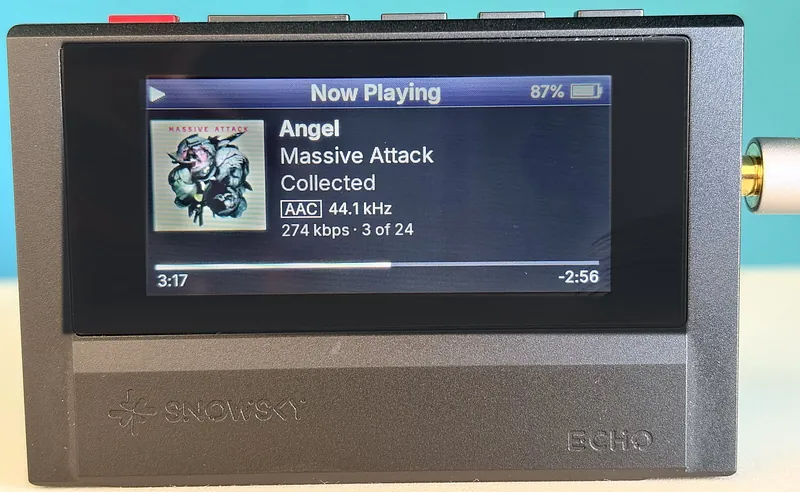
A new look for your Snowsky Echo: iPod-style menus, big readable text and Cover Flow.
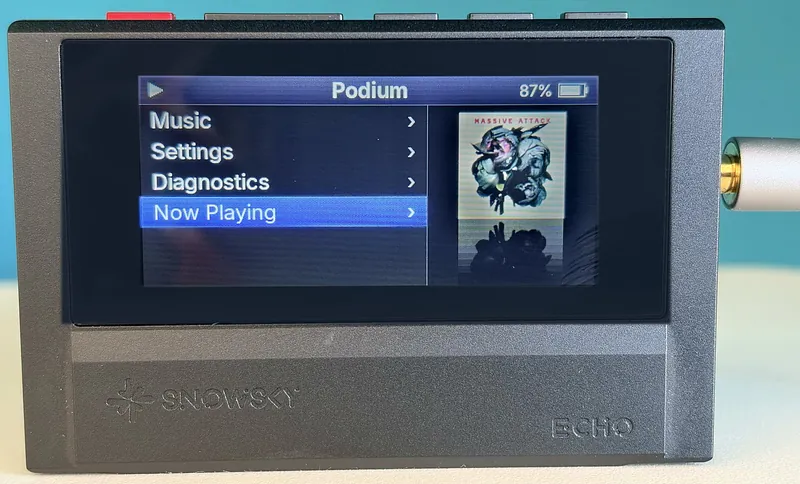
Early firmware, tested on a dozen players, both the 4 GB and the 8 GB Echo. For the full-size Echo only, not the Echo Mini. Replacing a player's firmware can leave it unable to start, so read How to install and the way back first.
On the player
What you get
- Big, readable textThree text sizes and eight highlight colors.
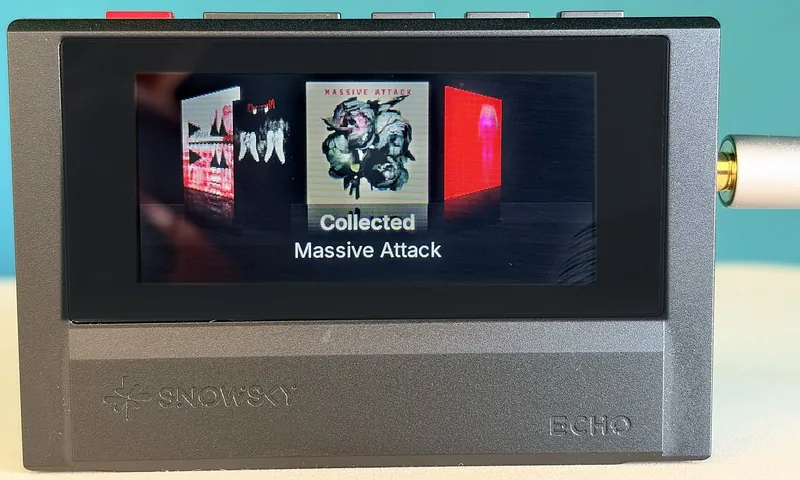
- Cover FlowFlip through every album, or play a random one.
- A library on the playerArtists, albums, genres, folders, favorites. It updates itself after you copy music.
- FLAC, MP3, WAV, M4AGapless, and it resumes where you stopped.
- Playlists and Up NextM3U playlists, CUE sheets and a queue with Play Next.
- EqualizerSix presets or your own five bands.
- Bluetooth headphonesPair once, they reconnect by themselves.
- Audiobooks and podcastsEach book and episode remembers its place.
More features and what is missing
- Choose Small (eight rows), Medium (six rows) or Large (five rows) text. Home has Music, Now Playing, Up Next, Settings and Diagnostics.
- Cover Flow is ordered by album artist and has a Random album tile.
- Music → Folders shows the card as it is; hold Play on a folder to play everything under it. Fast letter jumps in the lists.
- FLAC, MP3 and WAV up to 192 kHz and 24 bit; M4A with AAC-LC or Apple Lossless. Music comes from the microSD card (FAT32 or exFAT) or from internal storage.
- Shuffle songs or albums, repeat, sleep timer, album favorites.
- Custom EQ: 100 Hz to 10 kHz, ±10 dB.
- Volume in 60 steps of 1 dB, up to the DAC's full level; Low and High gain. Sensitive earphones can be very loud at the top: turn the volume down before you put them in.
- Bluetooth remembers up to six headphones.
- USB drive mode and USB DAC mode. DAC mode is tested on one player with Windows 11 and an Android phone.
- With the screen off, pause, volume, track skip and seek still work; skip by holding or by double-clicking (Settings → Skip songs). Wired headset buttons work too.
Not there yet
- No ReplayGain, lyrics or playback speed.
- APE and the other formats FiiO lists show up in the library but don't play.
- No refusal to start on an almost empty battery yet; charge before you install.
- Chinese, Japanese and Korean names show as
?. An image you can download or build yourself adds them: Chinese, Japanese and Korean names.
How to install
- Get readyCharge the player. Copy anything you want to keep off its internal storage.
- DownloadGet
ECHOV457.IMGwith the button above and plug the player into your computer. - Copy the filePut
ECHOV457.IMGon the top level of the player's internal storage, not in a folder. - Eject and waitEject the drive and unplug. The player shows "Updating" for a minute or two, then Podium starts.
The first start builds the music library, which takes a minute or two. Music goes on a microSD card (FAT32 or exFAT) or on internal storage.
Check the download (optional)
SHA-256 of ECHOV457.IMG: d4ab009cc1c59733977a47258c50a67e69296fe237627da966b526b7957ef767
The file's hash must match it. macOS and Linux: shasum -a 256 ECHOV457.IMG. Windows: Get-FileHash ECHOV457.IMG.
It came back to FiiO's firmware, or the screen stays black
If FiiO's firmware comes back after a short "Updating" and the file is gone, copy it again with plenty of free space on the drive. If the screen stays black, press the reset pinhole next to the 3.5 mm jack with a paperclip, wait a few seconds and press Power.
If the install still refuses, the first install can be written through the chip's USB recovery mode (maskrom) from a computer:
- Build the patched
rkdeveloptooland enter maskrom: switch the player fully off, hold every key except Power and plug USB in. The screen stays black;rkdeveloptool ldshowsMaskrom. The steps are indocs/device-install.mdanddocs/device-recovery.mdin the source zip. - Write the image's first 5 MiB into both firmware slots, slot 2 (sector 81920) first, then slot 1 (sector 0), read both back and reboot with
rd. Podium starts.
Let Claude do it. Unpack the source zip, start Claude Code in that folder and ask it to install Podium on your Echo following docs/device-install.md. It builds the recovery tool, backs up the player, runs the maskrom writes and checks every read-back.
Update to a newer Podium
- Connect the player running Podium and copy the new
ECHOVnnn.IMGto the top level of internal storage, not into a folder. - Eject. Podium checks the file, installs it, deletes it and shows "Update installed".
- Unplug, hold Power to turn the player off, then hold it again to start the new version.
Go back to FiiO's firmware
- Download FiiO's firmware for the Echo from the ECHO firmware download page on the FiiO forum and unzip it. Podium accepts only FiiO V2.0.0, the file
ECHOV200.IMG(39,845,892 bytes). - Delete any Podium
ECHOVnnn.IMGfrom the internal storage. - Copy
ECHOV200.IMGto the top level of the internal storage, unchanged, and eject both drives. - Podium checks the file, shows "Installing FiiO firmware" and writes it. Then unplug, switch the player off and on; FiiO's firmware starts.
Last resort
If the player does not start at all: create a file named MASKROM.REQ containing the text MASKROM REQ at the top of the internal storage before trouble starts, and Podium reboots into the chip's USB recovery mode at the next start. Otherwise enter maskrom by hand and write FiiO's image back with a patched rkdeveloptool. The steps are in docs/device-recovery.md in the source zip; they were proven on the full-size Echo from macOS.
Keys
| Key | In lists | On Now Playing |
|---|---|---|
| Volume up / down | Next / previous item; hold to scroll faster | Volume; hold Vol+ for the next track, Vol− for the previous one (audiobooks and podcasts: 30 s forward, 15 s back). Settings → Skip songs can make it a double-click instead, with hold to seek |
| Play | Select; a song plays the list from that song. Hold on an album for Favorites, hold on a song for Play Next / Add to Up Next, hold on a folder in Folders to play everything under it | Play / pause; hold to seek |
| Menu | Opens Up Next (also on Home) | |
| Back | Back; hold to go home | Back; hold to go home |
| Power | Screen off or on; hold 2 s to turn off | Same |
With the screen off, Play still pauses and resumes, a tap of volume changes it and holding volume skips tracks (or seeks, with Skip songs set to Double vol±). On a wired headset remote, the middle button pauses, two clicks skip and three go back.
Good to know
Feedback
Tried Podium, found a bug, or want something changed? Write here. Leave a contact if you'd like an answer. Podium is also discussed on Reddit.
Thanks, your message arrived.
The message was empty.
Too many messages from here in the last hour. Please try again later.
The message couldn't be sent. Please try again.
About
Podium is an independent project. It is not made, endorsed or supported by Snowsky or FiiO. It is a fork of EchoPod, the firmware for the Echo Mini, and is licensed under GPL-3.0-or-later with no warranty; the source is in the zip above. Use it at your own risk.